
Join Lesson 1 on Zoom / November 1st 2023, 6 – 9 PM CET
Intro:
Differences between a CPU and a GPU.
https://www.youtube.com/watch?v=-P28LKWTzrI
When writing shaders it’s important to note that Graphic Cards work a bit different than CPUs. Whereas a regular cpu has 1,2,4 or sometimes 64 cores, a graphic unit has thousands of them. Each of this cores can evaluate just one instruction at a time, very fast, but just one.
Throughout this course we will use the idea that our graphic card has enough cores to assign one of them to each pixel in our shader.
What’s a shader?
Small application that runs as fast as possible for each pixel (or vertex, or compute unit) All those cores run at the same time in parallel.
Official TouchDesigner definition of a shader: https://docs.derivative.ca/Shader
Here’s a small detail about how different shaders are orchestrated in the rendering pipeline:
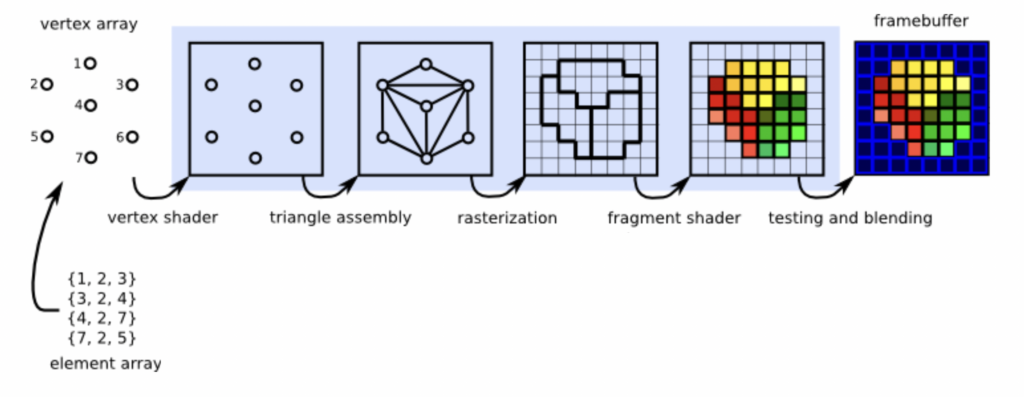
Some notes from the class
Coordinate system: https://www.houseofmath.com/encyclopedia/functions/theory-of-functions/fundamentals-of-functions/what-is-a-coordinate-system
It is a predefined ‘space’ that allows us to locate entities and measure the spatial relationships between them.
Our infamous ‘uv’ coordinate, given to us by TouchDesigner in the form of vUV.st
vUV.st is a variable that let us read a different value per pixel and thus allowing us to identify each individual one of them and its location.
The bottom-left very pixel gets assigned the value 0,0 and the most top-left receives 1,1. All the pixels in between get interpolated values, for example the center of our shader is 0.5, 0.5 .
That also means, that the gap between the values of uv depend on resolution. For a 16×16 texture, each pixel is 1/16 (0.0625) away from its neighbour; for a 4K texture that is 1/3840 (0,00026041666…) for the X axis. Side note here, one of the main differences between ‘gaming’ and ‘professional’ GPUs strive in the capacity of its memory for error-handling, think about that previous number and the accuracy that this chips need to work properly.
Sine function: https://mathworld.wolfram.com/Sine.html
Trigonometric functions in general are very useful when dealing with the part of math known as geometry.
A simple analog-style oscillator can be written in the form:
value = abs( sin( (axis * PI * frequency ) + offset) ) * amplitude
Vector math: https://mathworld.wolfram.com/Vector.html && https://mathworld.wolfram.com/VectorDifference.html
Dealing with vectors is dealing with positions and/or directions in space. It is the bread and butter of working with 3D environments and rendering engines. I find myself coming back over and over to this topic to refreshen and to deepen in my understanding of them. It’s fun sometimes 😉 for example when you think on incrementing the 4th element of a vec4 with timeAbs.seconds and imagine that you can make the first 3 elements of that vector travel in time through the 4th dimension, or something like that.
Color theory: https://en.wikipedia.org/wiki/Relative_luminance
We talked a bit about how our eyes are adapted to perceive some colours more than others, of course we only perceive a certain range of the electromagnetic spectrum (we don’t see wifi, or radio although they work the same way as light). I encourage you to play and adapt those ideas at your will. https://www.britannica.com/science/electromagnetic-spectrum
Useful info
Derivative has written some articles about shaders in TouchDesigner, you can find a lot of useful information in there.
https://derivative.ca/UserGuide/Write_a_GLSL_TOP
https://docs.derivative.ca/Write_a_GLSL_TOP
References
Khronos is the organisation responsible for openGL and other standards.
GLSL stands for Graphics Library Shading Language, and its also a standard defined by the Khronos group. It’s a c-style language.
https://www.khronos.org/opengl/wiki/OpenGL_Shading_Language
https://registry.khronos.org/OpenGL/specs/gl/GLSLangSpec.4.60.pdf
That online resource to download matcaps: https://github.com/nidorx/matcaps
And extra readings about that topic: https://www.clicktorelease.com/blog/creating-spherical-environment-mapping-shader/
What next
There’s many resources to continue your journey into shaders.
I can recommend, first to refreshen some of that simple geometry math and then some more resources:
https://thebookofshaders.com
(Incomplete, but fantastic interactive experience)
https://www.shadertoy.com
(almost infinite source of amazing shaders, good to poke around and learn from the masters)
https://www.youtube.com/@InigoQuilez
(the creator of shadertoy)
Files from the session
Optional Exercises
- Add a Color parameter to a container with the Solid Color shader and connect it to the uniform.
- Create an ‘Inverter’ module, that takes a texture as input and inverts its RGB channels
- Create a ‘Simple Oscillator’ module. It should be able to show a pattern (lines for example), and a frequency parameter should control the repetition of that pattern. Maybe add an amplitude pattern as well.